.png)
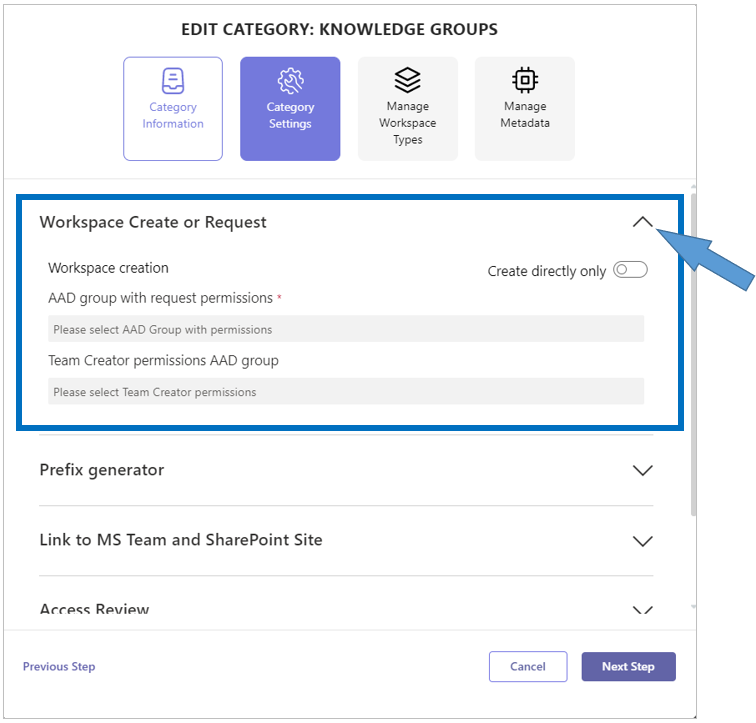
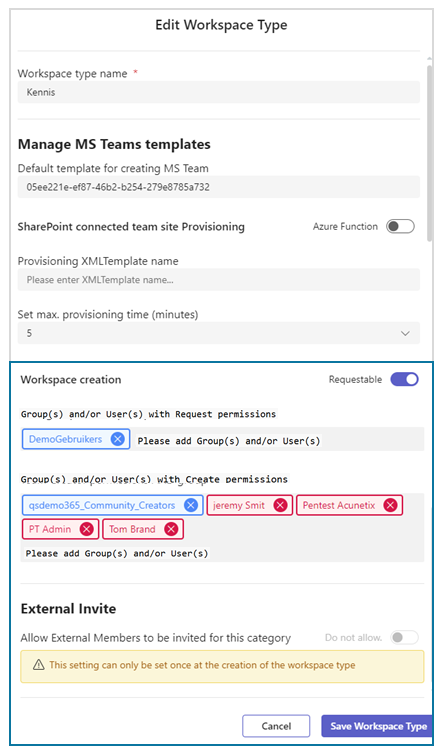
PortalTalk 2.6 changed the way permissions are assigned to the Create or Request/Approve workspaces process. Before 2.6 release the permissions settings for Create/Request were at the level of the PortalTalk Categories. Now we moved these permission settings to the Workspace Types of a Category. Workspace Types are more or less sub-categories of a category, a function already available for some time in PortalTalk.
Why did we moved these permissions?
The ability to manage the create proces of workspaces per category is already a unique feature of PortalTalk. By moving these settings to the the 'Workspace Types' we even make t it possible to set these permissions in more detail. Several large customers requested this ability to control the create proces of workspaces more granularly in their organizations.
How does it looks like?
First we show you the old configuration at Category level
This is the new configuration at Workspace Type level.
Changes to the resources which can be assigned to the permissions
This change gives us also the moment to improve even more. The objects to assign permissions with, were limited to only a single Entra-ID security group. Now, we extended this to multiple Entra-ID security groups and also, user objects. You can see them in the above new configuration screen.
If you were still a user of the User Create permissions assignment at the PortalTalk Classic UI, this is no longer available and replaced by this new and improved permissions assignment by Group and/or User objects.
Availability for Workspaces
This new, or better moved, function is available for these workspace in categories:
-
MS Teams team
-
SharePoint Teamsite(Site Collection)
So, not supported for:
-
SharePoint Teamsite(sub-sites)
Conversion from old to new settings
Conversion from the old Categories and Classic UI create permission settings are already done for the 2.6 release. So, all your permission settings can be found in the ‘Workspace Types 'of you configured 'Categories’.