.png)
To perform the update to PortalTalk V2.4.3, these administrative roles are required:
-
Global Admin in Microsoft 365, to do the PortalTalk App Consent
-
MS Teams Admin, to update the PortalTalk MS Teams app
-
PortalTalk Admin in PortalTalk, to make changes to the PortalTalk configuration (optional)
Steps to perform:
-
Update PortalTalk ’s permissions within your Microsoft 365 tenant. This is also referred as ‘the consent’.
If the above action is not executed, certain new functions of PortalTalk V2.4.3 will not work. We strongly urge you to run the updated consent.
Execute the PortalTalk consent
The permissions we need you to consent are needed to support the New MS Teams app to handle links (deep-link URL's) on PortalTalk buttons and MS Teams activities.
If you do not execute this consent after we updated PortalTalk to release 2.4.3, the PortalTalk buttons and activities will not work, unless you do the consent.
Execution
-
Make sure you're signed in to Microsoft 365 as a Global Admin
-
Navigate to the PortalTalk web UI via PortalTalk
-
At the top of the screen a notification shows the consent needs to be updated ('Because of a new software version, the consent has to be updated.')
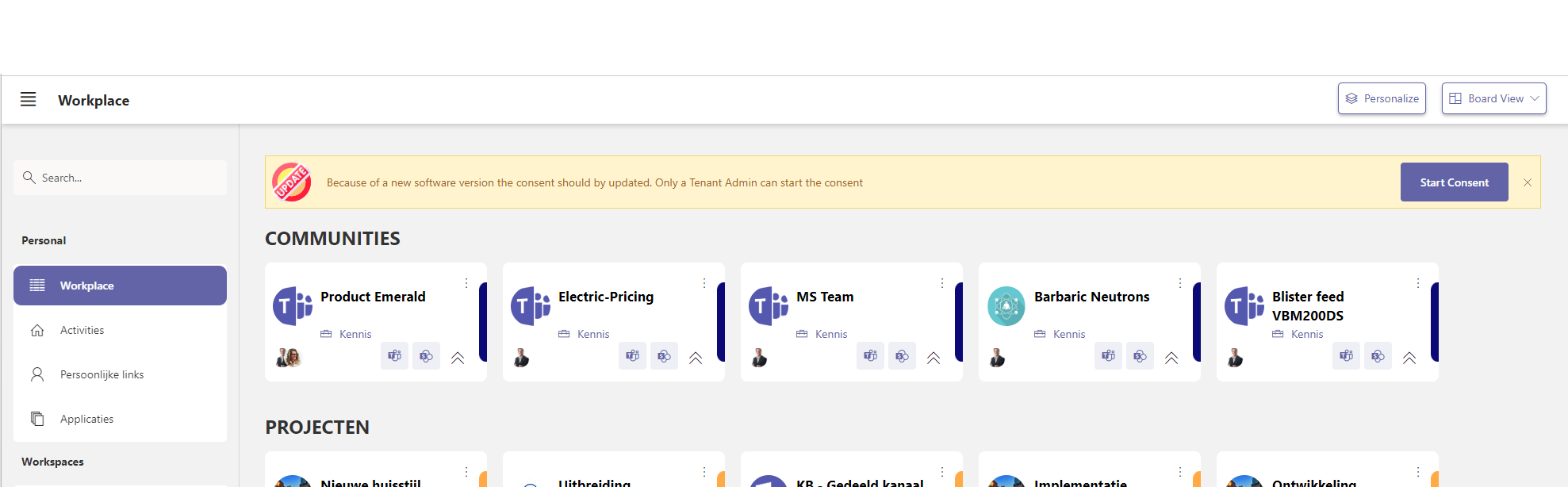
-
In the yellow update bar, click the ‘Start Consent’ button
-
You will be prompted to log on again. NOTE: this must be done by a Global Admin account
-
The screen below is displayed. Click on 'Accept' and the additional consent will be added.
.jpg?cb=7433e903f4190fc9e456a466beffca04)
-
The required consent is hereby granted and ready for PortalTalk Release 2.4.3