.png)
PortalTalk workspace categories configuration process steps
All category configuration actions are performed from the category list view in the Admin Center.
In the category list view, you can configure the workspace categories relevant to your organization.
The workspace category configuration process consists of four or five steps, depending on the category type.
Anywhere in the process of performing a configuration step, the option to go to the previous or next step is available.
In addition, you have the option to navigate directly to a specific configuration step by clicking the corresponding tab.
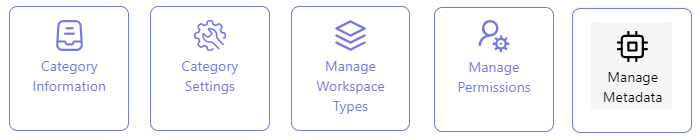
-
Category Information - In the first configuration step, the basic characteristics for the new category are defined, such as the Category Name and Category Type.
There are three possible category types. The category type selection in this first configuration step triggers a pre-specification as to which configuration actions are to be taken in the subsequent configuration steps. -
Category Settings - The second configuration step concerns the settings that determine the behavior of the category’s workspaces within the user application. If the category is set up for automatic import of MS Teams, based on a searchstring or your defined naming convention for your teams s also specified here.
-
Manage Workspaces Types - In the third creation step, a subcategorization can be defined to breakdown the workspaces within the category into Workspace Types. Automatic import of MS Teams based on the aforementioned attribute detection can be accommodated within just one single workspace type.
-
Manage Permissions - This configuration step concerns the SharePoint Teamsite workspace types only.
-
Manage Metadata - In the final configuration step, any metadata can be defined that, in the user application, can be used to further characterize the workspaces within the category.
See also: